HMP expansions and FD plots
The function tmfc_head_motion calculates HMP expansions and the FD time series. Also calculates task-FD correlations.
It is called automatically by the main function TMFC_denoise or can be run manually:
FD = tmfc_head_motion(SPM_paths,subject_paths,options);
The outputs are saved in the TMFC_denoise subfolder within each subject’s first-level GLM directory: 12HMP.mat, 24HMP.mat, and FD.mat.
The FD.mat file contains FD time series for each session, session-wise mean and maximum FD values, session-wise task-FD correlations, and mean/max FD across all sessions:
Field |
Description |
|---|---|
SPM_path |
Full path to original SPM.mat file. |
Subject |
Subject folder name. |
Sess (struct) |
Session-wise FD data:
|
FD_mean |
Mean FD across all sessions. |
FD_max |
Max FD across all sessions. |
taskFD_corr_mean |
Mean task-FD correlation across all sessions. |
taskFD_corr_maxabs |
Maximum abs(task-FD correlation) across all sessions. |
taskFD_corr_maxabs_name |
Name of the corresponding task condition. |
Framewise Displacement Plot
The GUI window for FD time-series inspection is opened with tmfc_plot_FD. It is called automatically by the main function TMFC_denoise.
This interface allows users to change the FD threshold using the button
and to calculate the number of flagged time points exceeding this threshold.
The selected threshold is subsequently applied during spike regression, if that denoising option is chosen.
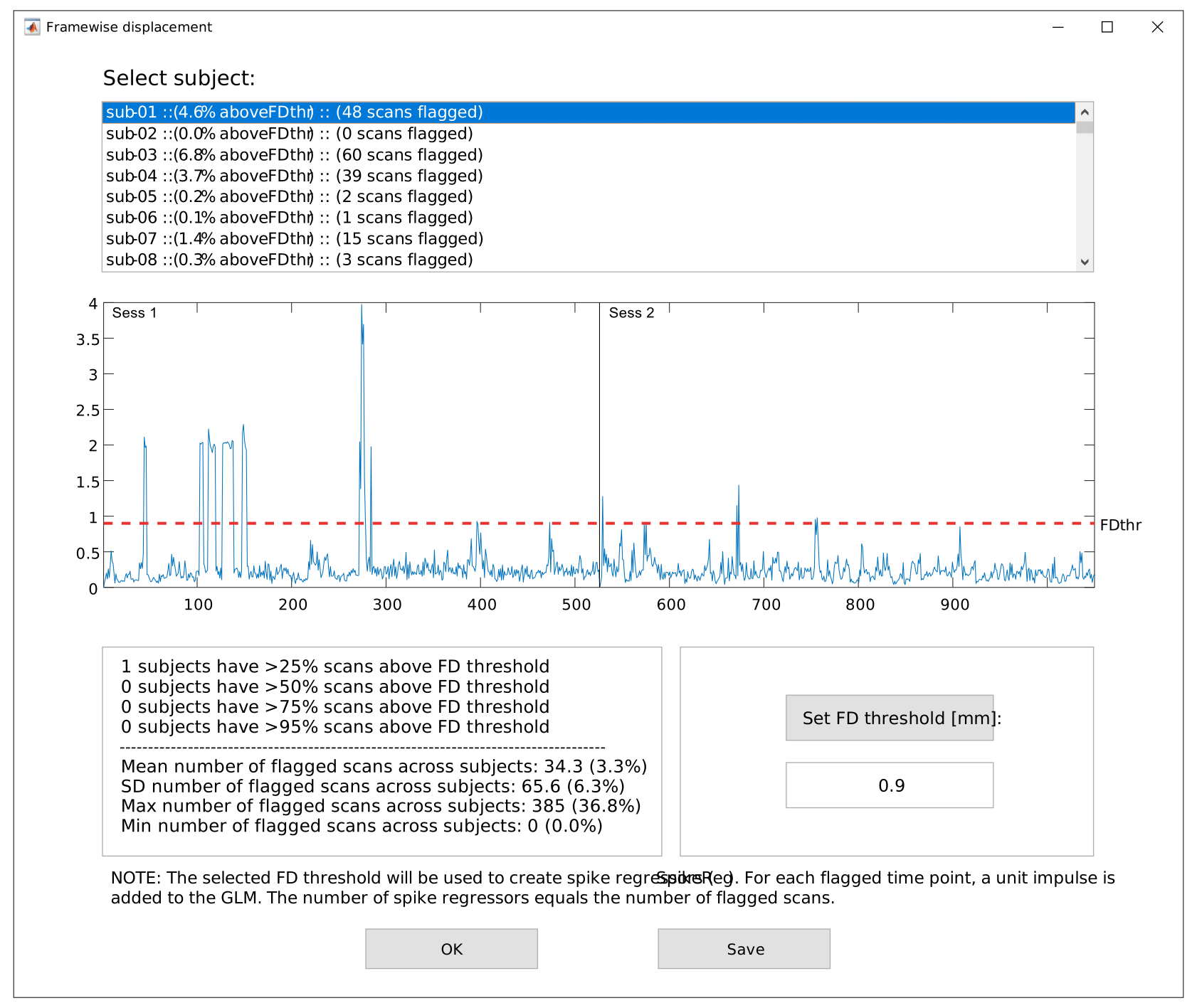
FD plot GUI.
To open FD plot GUI manually run:
% Allows saving group FD statistics only:
FDthr = tmfc_plot_FD(FD);

% Allows saving group FD statistics and TMFC denoise settings:
FDthr = tmfc_plot_FD(FD,options,SPM_paths,subject_paths,anat_paths,func_paths);
Pressing the button stores individual subject FD data and group-wise FD statistics in a single *.mat file:
Field |
Description |
|---|---|
denoising_settings (struct) |
Selected TMFC_denoise settings:
|
FD (struct) |
Individual FD data for all subjects (see FD.mat table). |
FDthr |
FD threshold (in millimeters). |
flagged (struct) |
Flagged time points for each subject.
|
max_flagged |
Maximum number of flagged time points across subjects. |
mean_flagged |
Mean number of flagged time points across subjects. |
min_flagged |
Minimum number of flagged time points across subjects. |
N_25prc |
Number of subjects with >25% of scans above the selected FD threshold. |
N_50prc |
Number of subjects with >50% of scans above the selected FD threshold. |
N_75prc |
Number of subjects with >75% of scans above the selected FD threshold. |
N_95prc |
Number of subjects with >95% of scans above the selected FD threshold. |
sd_flagged |
SD number of flagged time points across subjects. |