Select Structural Images
If the user chooses to calculate tissue-based regressors and/or DVARS, the TMFC_denoise GUI
prompts them to select T1-weighted structural images in native space.
If existing SPM segmentation outputs are found in the structural-image folder, including GM, WM, and CSF tissue-probability maps and the deformation field, TMFC_denoise reuses them for mask generation instead of repeating segmentation.
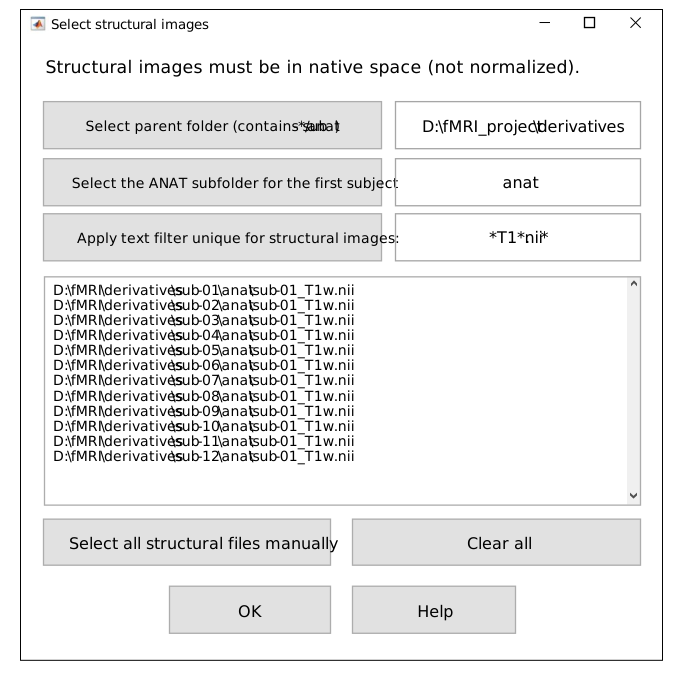
Select structural images GUI.
First, select the parent folder that contains the subject folders with ANAT subfolders for T1-weighted structural images in native space (if necessary).
By default, the parent folders for first-level GLMs
and ANAT subfolders are assumed to be the same (in BIDS they differ).
Second, select the ANAT subfolder for the first subject.
Third, apply a text filter (e.g., *T1*.nii*) to match all T1 images.
Images may be in *.img/*.hdr, *.nii or *.nii.gz format.
Alternatively, all structural images can be selected manually — for example, when they are stored in a single folder. To do this, press:
To open Select structural images GUI independently of the main TMFC_denoise function, run:
anat_paths = tmfc_select_anat_GUI(subject_paths);
Output:
anat_paths— Full paths to native-space T1-weighted structural images (cell array)
Example 1 — SPM-like Folder Structure
In this case, there is no need to change the parent folder to select structural images.
project/
├─ rawdata/      # DICOM
└─ derivatives/  <-------- [Parent folder with ANAT subfolders (BY DEFAULT)]
   ├─ sub-01/    <-------------------------------- [Selected subject folder]
   │  ├─ anat/   <-------- [Select the ANAT subfolder for the first subject] (1)
   │  │  ├─ *T1*.nii  <--------------------------------- [Apply text filter] (2)
   │  │  └─ *T1*.nii derivatives (tissue seg., bias-corrected T1, etc.)
   │  ├─ func/
   │  │  ├─ sess-01/
   │  │  │  ├─ Unprocessed functional files (*.nii)
   │  │  │  └─ Preprocessed functional files:
   │  │  │       • smoothed + normalized + realigned (e.g., swar*.nii)
   │  │  │       • unsmoothed + normalized + realigned (e.g., war*.nii)
   │  │  └─ sess-02/ ...
   │  └─ stat/       # First-level models (one folder per GLM)
   │     ├─ GLM-01/
   │     │  ├─ SPM.mat    <------------------------- [Selected SPM.mat file]
   │     │  └─ TMFC_denoise/  <----------------------------- [Output folder]
   │     └─ GLM-02/ ...
   └─ sub-02/ ...
Example 2 — BIDS-like Folder Structure
Select the parent folder that contains all subject folders with
ANATsubfolders (if necessary).Select the
ANATsubfolder for the first subject and apply text filter (e.g.,*T1*.nii) to match all T1 images.
Here, the default parent folder project/derivatives/firstlevel-spm (with STAT subfolders)
needs to be changed to project — the parent folder with ANAT subfolders.
project/   <------------------- [Select parent folder (contains sub-*/anat)]  (1)
├── sub-01/
│   ├── ses-01/
│   │   ├── anat/   <----- [Select the ANAT subfolder for the first subject]  (2)
│   │   │   └── *T1*.nii   <---------------------------- [Apply text filter]  (3)
│   │   └── func/         # Unprocessed functional files
│   └── ses-02/ ...
├── sub-02/ ...
└── derivatives/
    ├── fmriprep/
    │   ├── sub-01/
    │   │   ├── ses-01/
    │   │   │   └── func/
    │   │   │       └── Preprocessed functional files:
    │   │   │           • smoothed + normalized + realigned
    │   │   │           • unsmoothed + normalized + realigned
    │   │   └── ses-02/ ...
    │   └── sub-02/ ...
    └── firstlevel-spm/<-[Parent folder with ANAT (BY DEFAULT)](Needs to be changed)
        ├── sub-01/   <--------------------------- [Selected subject folder]
        │   ├── GLM-01/
        │   │   ├── SPM.mat   <--------------------- [Selected SPM.mat file]
        │   │   └── TMFC_denoise/  <------------------------ [Output folder]
        │   └── GLM-02/ ...
        └── sub-02/ ...
Example 3 — Other (Non-BIDS) Folder Structure
Select the parent folder that contains all subject folders with
ANATsubfolders (if necessary).Select the
ANATsubfolder for the first subject and apply text filter (e.g.,*T1*.nii) to match all T1 images.
Here, the default parent folder project/firstlevel-spm (with STAT subfolders)
needs to be changed to project/nifti — the parent folder with ANAT subfolders.
project/
├─ rawdata/   # DICOM
├─ nifti/   <------------------- [Select parent folder (contains sub-*/anat)]  (1)
│  ├─ sub-01/
│  │  ├─ anat/  <---------- [Select the ANAT subfolder for the first subject]  (2)
│  │  │  ├─ *T1*.nii  <---------------------------------- [Apply text filter]  (3)
│  │  │  └─ *T1*.nii derivatives (tissue seg., bias-corrected T1, etc.)
│  │  └─ func/
│  │     ├─ sess-01/
│  │     │  ├─ Unprocessed functional files (*.nii)
│  │     │  └─ Preprocessed functional files (*.nii):
│  │     │     • smoothed + normalized + realigned
│  │     │     • unsmoothed + normalized + realigned
│  │     └─ sess-02/ ...
│  └─ sub-02/ ...
└─ firstlevel-spm/ <-------[Parent folder (BY DEFAULT)](Needs to be changed!)
   ├─ sub-01/   <---------------------------------- [Selected subject folder]
   │  ├─ GLM-01/
   │  │  ├─ SPM.mat   <------------------------------ [Selected SPM.mat file]
   │  │  └─ TMFC_denoise/   <-------------------------------- [Output folder]
   │  └─ GLM-02/ ...
   └─ sub-02/ ...