Select Subjects
At the first step, the TMFC_denoise GUI prompts the user to select the first-level GLMs to be updated with nuisance regressors.
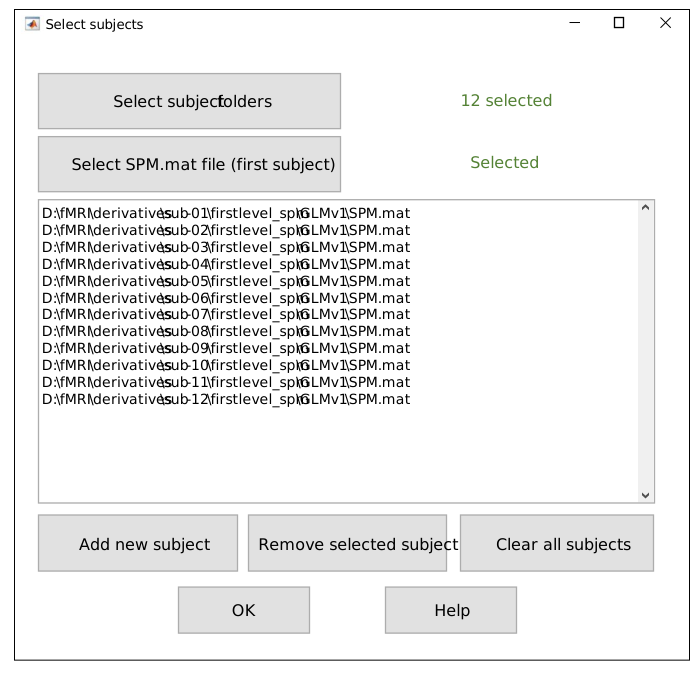
Select subjects GUI.
First, select the subject folders, each containing a subfolder with first-level GLMs.
Then, select the SPM.mat file for the GLM of interest for the first subject.
Paths to GLMs for all other subjects will be constructed automatically.
To open Select subjects GUI independently of the main TMFC_denoise function, run:
[SPM_paths, subject_paths] = tmfc_select_subjects_GUI(0);
Outputs:
SPM_paths— Full paths to selectedSPM.matfiles (cell array)subject_paths— Paths to selected subject folders (cell array)
Example 1 — SPM-like Folder Structure
Select the subject folders (each containing a
STATsubfolder with anSPM.matfile).Select the
SPM.matfile for the first subject.
project/
├─ rawdata/   # DICOM
└─ derivatives/
   ├─ sub-01/   <------------------------------------- [Select subject folder #1] (1)
   │  ├─ anat/
   │  │  ├─ *T1*.nii
   │  │  └─ *T1*.nii derivatives
   │  ├─ func/
   │  │  ├─ sess-01/
   │  │  │  ├─ Unprocessed functional files (*.nii)
   │  │  │  └─ Preprocessed functional files:
   │  │  │       • smoothed + normalized + realigned (e.g., swar*.nii)
   │  │  │       • unsmoothed + normalized + realigned (e.g., war*.nii)
   │  │  └─ sess-02/ ...
   │  └─ stat/             # First-level models (one folder per GLM)
   │     ├─ GLM-01/
   │     │  ├─ SPM.mat   <-------------------- [Select SPM.mat for first subject] (2)
   │     │  └─ TMFC_denoise/  <---------------------------------- [Output folder]
   │     └─ GLM-02/ ...
   └─ sub-02/ ...          <-------------------------- [Select subject folder #2] (1)
Example 2 — BIDS-like Folder Structure
Select the subject folders (each containing a
STATsubfolder with anSPM.matfile).Select the
SPM.matfile for the first subject.
project/
├── sub-01/
│   ├── ses-01/
│   │   ├── anat/
│   │   │   └── *T1*.nii
│   │   └── func/         # Unprocessed functional files
│   └── ses-02/ ...
├── sub-02/ ...
└── derivatives/
    ├── fmriprep/
    │   ├── sub-01/
    │   │   ├── ses-01/
    │   │   │   └── func/
    │   │   │       └── Preprocessed functional files:
    │   │   │           • smoothed + normalized + realigned
    │   │   │           • unsmoothed + normalized + realigned
    │   │   └── ses-02/ ...
    │   └── sub-02/ ...
    └── firstlevel-spm/
        ├── sub-01/   <------------------------- [Select subject folder #1] (1)
        │   ├── GLM-01/
        │   │   ├── SPM.mat   <--------- [Select SPM.mat for first subject] (2)
        │   │   └── TMFC_denoise/  <----------------------- [Output folder]
        │   └── GLM-02/ ...
        └── sub-02/ ...   <--------------------- [Select subject folder #2] (1)
Example 3 — Other (Non-BIDS) Folder Structure
Select the subject folders (each containing a
STATsubfolder with anSPM.matfile).Select the
SPM.matfile for the first subject.
project/
├─ rawdata/   # DICOM
├─ nifti/
│  ├─ sub-01/
│  │  ├─ anat/
│  │  │  ├─ *T1*.nii
│  │  │  └─ *T1*.nii derivatives
│  │  └─ func/
│  │     ├─ sess-01/
│  │     │  ├─ Unprocessed functional files (*.nii)
│  │     │  └─ Preprocessed functional files (*.nii):
│  │     │     • smoothed + normalized + realigned
│  │     │     • unsmoothed + normalized + realigned
│  │     └─ sess-02/ ...
│  └─ sub-02/ ...
└─ firstlevel-spm/
   ├─ sub-01/   <--------------------------------- [Select subject folder #1] (1)
   │  ├─ GLM-01/
   │  │  ├─ SPM.mat   <------------------- [Select SPM.mat for first subject] (2)
   │  │  └─ TMFC_denoise/   <-------------------------------- [Output folder]
   │  └─ GLM-02/ ...
   └─ sub-02/ ...   <----------------------------- [Select subject folder #2] (1)