Select Functional Images
If the user chooses to calculate tissue-based regressors and/or DVARS, the TMFC_denoise GUI
prompts them to select unsmoothed preprocessed functional images (in MNI space).
Note: The updated GLMs are specified and estimated using the functional images listed in the
original SPM.mat files (the SPM.xY.VY field). Thus, if smoothed images were used originally,
they will be retained in the updated GLMs, while nuisance regressors will be calculated from the unsmoothed images.
Although tissue-specific signals can be extracted from smoothed images (e.g., if unsmoothed data are unavailable),
but unsmoothed images are preferred for noise-regressor creation.
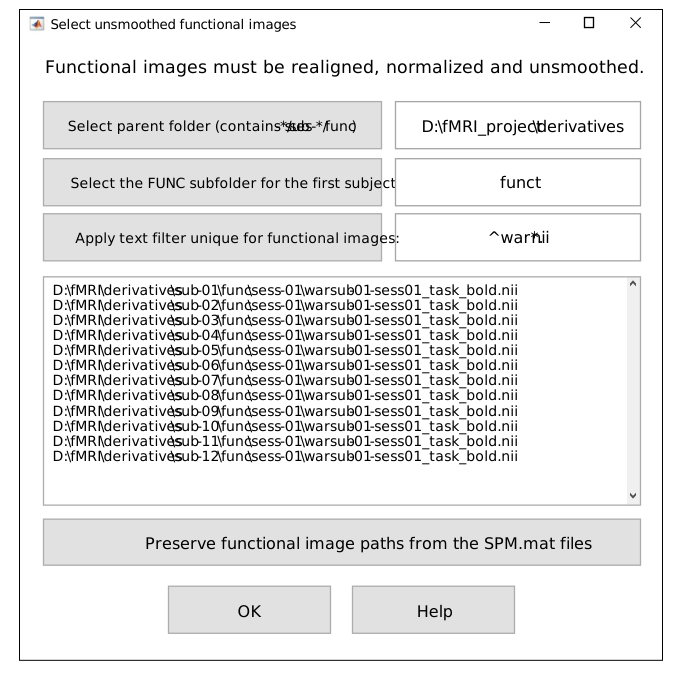
Select functional images GUI.
First, select the parent folder that contains the subject folders with FUNC subfolders for
preprocessed T2*-weighted functional images (if necessary).
By default, the parent folders for first-level GLMs
and FUNC subfolders are assumed to be the same (in BIDS they differ).
Second, select the FUNC subfolder for the first subject.
This subfolder may include multiple session-specific subfolders (e.g., sess-01, sess-02).
Third, apply a text filter (e.g., war.nii) to match all unsmoothed images.
Images can be either *.img/*.hdr (3D) or *.nii (3D/4D). The *.nii.gz format is not supported.
NOTE: You can also try applying the text filter without changing folders.
If you do NOT select a new parent folder (FUNC root), the toolbox will use the same parent directory as the STAT folder (SPM.mat).
If you do NOT select a FUNC subfolder for the first subject, the toolbox will attempt to use the same relative structure as in SPM.xY.VY paths.
In both cases, the search will be performed automatically using paths derived from the original SPM.mat configuration, so it may still find the correct functional files — provided their locations have not changed.
Sessions/runs:
Layout sub-01/func/sess-* → select func as the FUNC subfolder.
Layout sub-01/ses-*/func → leave the subfolder unselected (or select the subject folder); the toolbox will resolve each session/run automatically.
If the GLMs were already specified for unsmoothed images, simply press:
To open Select functional images GUI independently of the main TMFC_denoise function, run:
func_paths = tmfc_select_func_GUI(SPM_paths,subject_paths);
Output:
func_paths— Full paths to unsmoothed preprocessed (MNI-space, realigned) functional images (cell array)
Example 1 — SPM-like Folder Structure
In this case, there is no need to change the parent folder to select functional images.
project/
├─ rawdata/      # DICOM
└─ derivatives/  <------------------ [Parent folder with FUNC subfolders (BY DEFAULT)]
   ├─ sub-01/    <------------------------------------------ [Selected subject folder]
   │  ├─ anat/
   │  │  ├─ *T1*.nii
   │  │  └─ *T1*.nii derivatives
   │  ├─ func/  <--------------- [Select the FUNC subfolder for the first subject] (1)
   │  │  ├─ sess-01/
   │  │  │  ├─ Unprocessed functional files (*.nii)
   │  │  │  └─ Preprocessed functional files:
   │  │  │     •smoothed + normalized + realigned (e.g., swar*.nii)
   │  │  │     •unsmoothed + norm. + real. (e.g., war*.nii) <-- [Apply text filter](2)
   │  │  └─ sess-02/ ...
   │  └─ stat/       # First-level models (one folder per GLM)
   │     ├─ GLM-01/
   │     │  ├─ SPM.mat    <----------------------------------- [Selected SPM.mat file]
   │     │  └─ TMFC_denoise/  <--------------------------------------- [Output folder]
   │     └─ GLM-02/ ...
   └─ sub-02/ ...
Example 2 — BIDS-like Folder Structure
Select the parent folder that contains all subject folders with
FUNCsubfolders (if necessary).Apply text filter (e.g.,
*war*.nii,*wr*.nii, or*preproc*.nii.gz) to match all fMRI images.
Here, the default parent folder project/derivatives/firstlevel-spm (with STAT subfolders)
needs to be changed to project/derivatives/fmriprep — the parent folder with FUNC subfolders.
project/
├── sub-01/
│   ├── ses-01/
│   │   ├── anat/
│   │   │   └── *T1*.nii
│   │   └── func/         # Unprocessed functional files
│   └── ses-02/ ...
├── sub-02/ ...
└── derivatives/
    ├── fmriprep/   <---------- [Select parent folder (contains sub-*/ses-*/func)] (1)
    │   ├── sub-01/
    │   │   ├── ses-01/
    │   │   │   └── func/
    │   │   │       └── Preprocessed functional files:
    │   │   │          •smoothed + normalized + realigned
    │   │   │          •unsmoothed + norm. + real. <---------- [Apply text filter] (2)
    │   │   └── ses-02/ ...
    │   └── sub-02/ ...
    └── firstlevel-spm/ <-[Parent folder with FUNC (BY DEFAULT)](Needs to be changed!)
        ├── sub-01/   <------------------------------------- [Selected subject folder]
        │   ├── GLM-01/
        │   │   ├── SPM.mat   <------------------------------- [Selected SPM.mat file]
        │   │   └── TMFC_denoise/  <---------------------------------- [Output folder]
        │   └── GLM-02/ ...
        └── sub-02/ ...
Example 3 — Other (Non-BIDS) Folder Structure
Select the parent folder that contains all subject folders with
FUNCsubfolders (if necessary).Select the
FUNCsubfolder for the first subject and apply text filter (e.g.,*war*.nii,*wr*.nii, or*preproc*.nii.gz) to match all fMRI images.
Here, the default parent folder project/firstlevel-spm (with STAT subfolders)
needs to be changed to project/nifti — the parent folder with FUNC subfolders.
project/
├─ rawdata/   # DICOM
├─ nifti/   <---------------- [Select parent folder (contains sub-*/ses-*/func)] (1)
│  ├─ sub-01/
│  │  ├─ anat/
│  │  │  ├─ *T1*.nii
│  │  │  └─ *T1*.nii derivatives
│  │  └─ func/    <----------- [Select the FUNC subfolder for the first subject] (2)
│  │     ├─ sess-01/
│  │     │  ├─ Unprocessed functional files (*.nii)
│  │     │  └─ Preprocessed functional files (*.nii):
│  │     │     • smoothed + normalized + realigned
│  │     │     • unsmoothed + normalized + realigned  <----- [Apply text filter] (3)
│  │     └─ sess-02/ ...
│  └─ sub-02/ ...
└─ firstlevel-spm/ <----------[Parent folder (BY DEFAULT)](Needs to be changed!)
   ├─ sub-01/   <------------------------------------- [Selected subject folder]
   │  ├─ GLM-01/
   │  │  ├─ SPM.mat   <--------------------------------- [Selected SPM.mat file]
   │  │  └─ TMFC_denoise/   <----------------------------------- [Output folder]
   │  └─ GLM-02/ ...
   └─ sub-02/ ...