Prepare Your Data
TMFC_denoise uses information from SPM.mat files to obtain paths to functional images and SPM binary masks.
Original GLMs
The original model must be estimated (not only specified) in SPM12 or SPM25.
Note: Original models must include six head motion regressors, and the specified functional images must be realigned and normalized (smoothing is optional).
If you estimated first-level GLMs and later moved the GLM or functional-image folders to another location,
you need to update the paths specified in the SPM.mat files (SPM.xY.VY and SPM.swd fields).
To change paths in SPM.mat files using the GUI, enter the following command in the MATLAB window:
tmfc_change_paths_GUI
If you use the TMFC toolbox GUI, click .
Select the subjects whose SPM.mat files you want to update.
Enter the old path pattern (see SPM.swd field in the SPM.mat file) and the new path pattern:
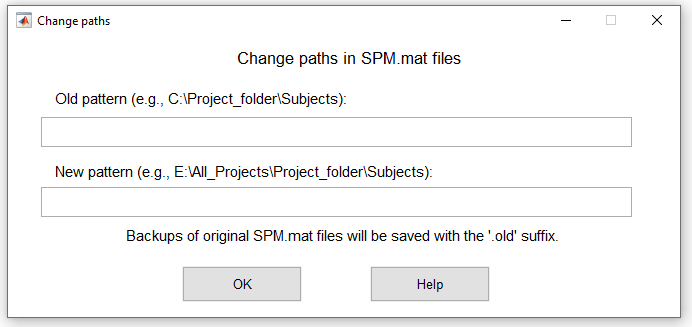
Change paths GUI.
To change paths in SPM.mat files from the command line, enter:
tmfc_change_paths_GUI(SPM_paths, old_path, new_path)
Structural Images
To calculate tissue-based regressors and/or DVARS, you need to create tissue-specific binary masks. These masks are generated from T1-weighted structural images. Structural images must be in native space, since binary masks are created in native space and later normalized to MNI space.
TMFC_denoise first searches for existing SPM segmentation outputs in the structural-image folder. If GM, WM, CSF tissue-probability maps and the deformation field are found, they are reused for mask generation. Otherwise, segmentation is performed automatically.
Structural images can be coregistered with functional images, but this is not required. Final masks are normalized to MNI space using the deformation field estimated during segmentation and then resliced to match the voxel grid of the first functional image. No additional coregistration transform is estimated at this stage.
Structural images may be in *.img/*.hdr, *.nii, or *.nii.gz format.
Note: To automatically select structural images using the GUI, they must:
- Have the same root folder and subfolder structure,
- Share the same file format, and
- Have a consistent name pattern (to be uniquely detected via a text filter, e.g., *T1*.nii*).
Functional Images
To calculate tissue-based regressors or DVARS, you should extract tissue-specific signals from unsmoothed functional images. Functional images must be realigned and normalized, as binary masks are normalized to MNI space.
If your original model was specified for unsmoothed images, simply press during functional image selection. If your model was specified for smoothed images, you need to provide paths to unsmoothed images.
In principle, tissue-specific signals can be extracted from smoothed images (e.g., if unsmoothed data are unavailable), but unsmoothed images are preferred for noise-regressor creation.
Images can be either *.img/*.hdr (3D) or *.nii (3D/4D). The *.nii.gz format is not supported.
Note: To automatically select functional images using the GUI, they must:
- Have the same root folder and subfolder structure,
- Share the same file format, and
- Follow a consistent name pattern (to be uniquely detected via a text filter, e.g., *war*.nii).